
Six vehicle types
Car, truck, motorcycle, scooter, boat and other, each with its make, model, year, engine size, tank sizes and odometer — plus plate number and VIN if you want them recorded.
Features
You type in the odometer, the litres and what you paid. The app works out the rest: consumption between full tanks, what a kilometre costs, where the month went, and how this year compares with last.
Fuel
A fill-up takes the odometer, the date, the price per unit, the quantity and the total. Fill in two of price, quantity and total and the app works out the third. Once a vehicle has a fill-up on file with both a volume and a sum behind it, the next new entry offers the price from that one and shows how far you have driven since.
Consumption is the figure people get wrong by hand. The app measures the distance between two full tanks of the same fuel and divides by what went in between. Until there are two full tanks to work with, it prints a dash rather than a number.
Statistics
Pick a period and the screen answers three questions: how much you spent, what you spent it on, and what a kilometre cost you. The tabs are All time, Current month, Previous month, 3 months and Year; on All time you can also set any two dates yourself. There is no weekly view.
Two things worth knowing. 3 months and Year are windows that end on the last day of the previous month, so the month you are in is not counted in them. And a new vehicle starts with All time alone — the other tabs appear as history builds up, Year after roughly twelve months of records. When a figure cannot be calculated from what you have entered, the app prints a dash instead of a zero.
Reminders
A reminder carries a vehicle, a name, an expense category, an optional expected amount, a schedule and how far ahead you want warning — in days or in distance. The list hands all of it back: oil and filter change on the daily driver, each 15,000 km starting from 51,619 km, 437 km remaining; liability insurance, once on 15 November, 46 days remaining. A swipe one way marks a reminder done, a swipe the other way postpones it.
None of this needs the server. A background task looks the reminders over on the phone itself and raises the notification there, and a push from the server only makes it arrive sooner when there is a connection. Two channels are used: one for what is already overdue, and a quieter one for what is coming up.
Monthly limits
A limit is set per vehicle and covers either everything, or one whole expense type, or a single category. Several can run at once: on the screen here, All expenses stands at 51 per cent — 163.48 of 320 EUR, with 156.52 left — and Fuel at 61 per cent, 122.68 of 200 EUR. The same progress appears on the home screen, where the card is not shown at all until a limit exists. Spending in another currency is converted into yours before it counts against the limit.
Monthly limits are part of MiExpenses Premium, and they travel with the account: a limit is saved to the server first, so a second phone signed in to the same account already shows it. With no connection it is kept on the phone and sent the next time there is one, and it keeps counting meanwhile — unlike almost everything else here, a limit needs no connection to do its arithmetic.
Year in numbers
One screen for the whole year: distance, litres, money, how many records you made, the breakdown by category and the most expensive fill-up. At the foot of it, the same total set against last year, as a percentage up or down.
For a year still running, both years are cut off on the same calendar day, so the comparison is like for like — on 30 September it weighs January to September against January to September. The screen lives in the overflow menu on Statistics, and it saves as an image if you want to send it to someone. It is part of MiExpenses Premium.
Appearance
The default is Follow system, so on Android 10 and newer the app goes dark when the phone does. You can pin a fixed theme instead at any time: Light, Dark, Triad, Neutral Light or Neutral Dark. Three of them are always dark and two are always light — those ignore the system setting entirely.
Material You is offered on Android 12 and newer, where the device supports it, and the app then takes its colours from your wallpaper. The new colours appear at the next cold start, not the moment you pick the theme. The screenshot here is the home screen with the phone switched to night mode.
Details you only notice when they are missing.
Car, truck, motorcycle, scooter, boat and other, each with its make, model, year, engine size, tank sizes and odometer — plus plate number and VIN if you want them recorded.
Petrol, diesel, gas (LPG or CNG), electric, hydrogen or other. A vehicle can be set up with two of them, and the expense form then offers only those two.
Distance in kilometres or miles; volume in litres, UK gallons or US gallons. They are two independent settings, not one metric-or-imperial switch.
Nine built-in types — fuel, service maintenance, insurance, lease, spare parts, taxes, parking, fees, other — and your own subcategories under any of them.
Save a filled-in form as a template and reuse it from Quick entry on the home screen. Templates sort themselves by how often you use them, and they carry no odometer reading or date. Templates are part of MiExpenses Premium, and they follow the account to another phone.
One vehicle at a time, handed to whatever app you pick from the share sheet. The CSV carries the vehicle, the all-time summary and every record; the PDF is a report, and its table leaves out records ticked Exclude from statistics.
Free text on every expense, so what the money was actually for is attached to the number and not remembered wrongly six months later.
Pick Boat as the vehicle type and distances are shown in nmi — on screen, in the CSV and in the PDF. The kilometre-to-mile conversion is not applied to boats at all.
Distance and volume are two separate settings, so kilometres with US gallons is as valid a combination as miles with litres. Consumption follows from them: L/100 km, or distance per unit of volume if that is how you read it. Boats are the exception to all of it — their distances are measured in nautical miles, and the kilometre-to-mile conversion is never applied to them.
More than 160 currencies. Enter an expense in the currency you actually paid in. Totals, statistics and limits are then converted into your own currency at the rate the app holds for that currency — not the rate that applied on the day you spent it. Rates reach the app from the MiExpenses server, which refreshes them once a day from the European Central Bank feed and, where it is configured, a commercial rates provider. The app itself never talks to a rates provider. Not every currency is quoted, so some are never refreshed.
You can give another registered user access to a vehicle by e-mail, at one of three levels: View, Edit, or Move ownership. It is the whole vehicle or nothing — every record attached to it goes with it, and individual records cannot be held back.
Once they accept, they get the vehicle, all of its expenses and reminders, including entries made by other people it is shared with, and a copy of your expense categories. On View they can only read: the fields are not editable and there is no save or delete. On Edit they can add expenses and reminders, and change or delete only the ones they created themselves — the server checks that, not just the buttons in the app. Move ownership is permanent: you set a PIN, they type it, the vehicle and everything on it becomes theirs, and you are left with View. There is no undo.
What is stored, where it goes and who can see it is set out in the privacy policy.
Android 8.0 and newer. The app is free to install and free to use; MiExpenses Premium is a one-time purchase that opens monthly limits, expense templates, the year in numbers, and the global statistics list without the video. It is not a subscription, and nothing is charged again. You do need an account, and most of what the app does needs a connection.

Free to install. Android 8.0 and newer.
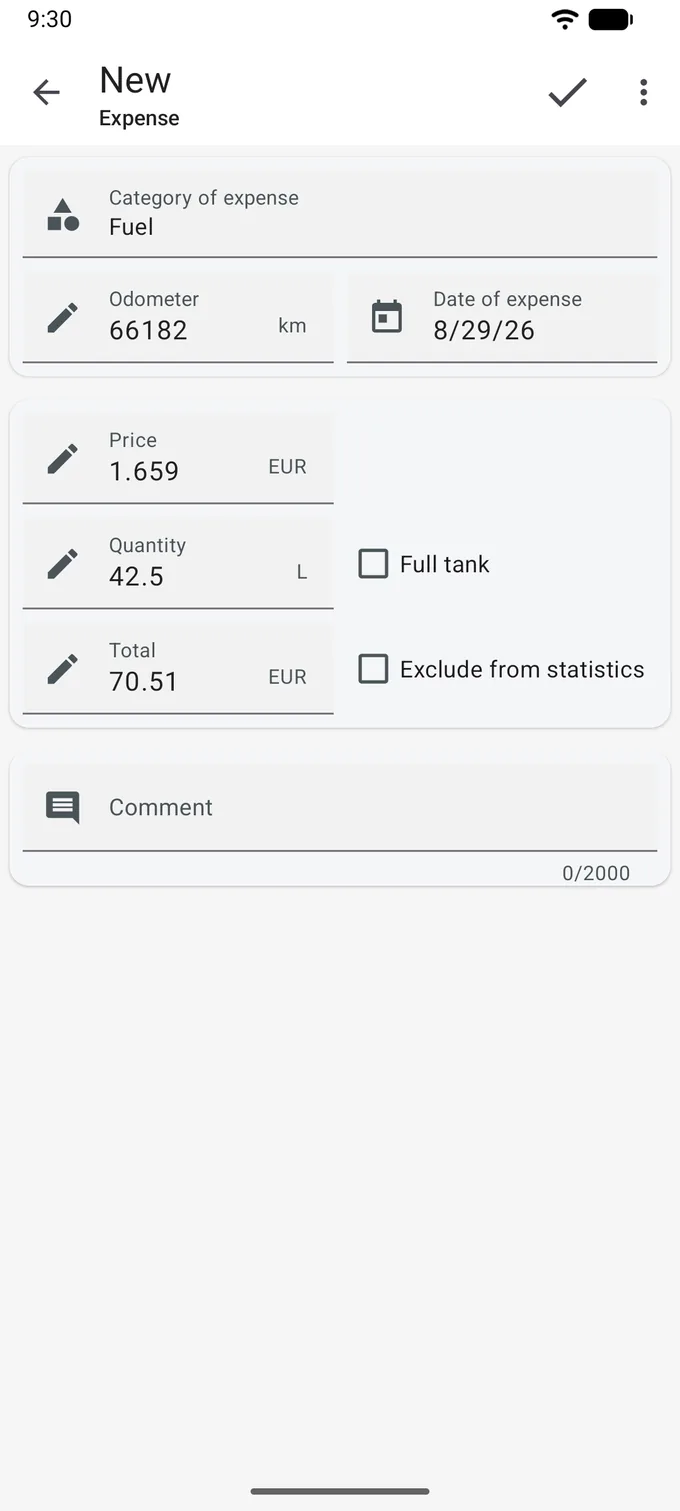
Consumption, worked out between full tanks
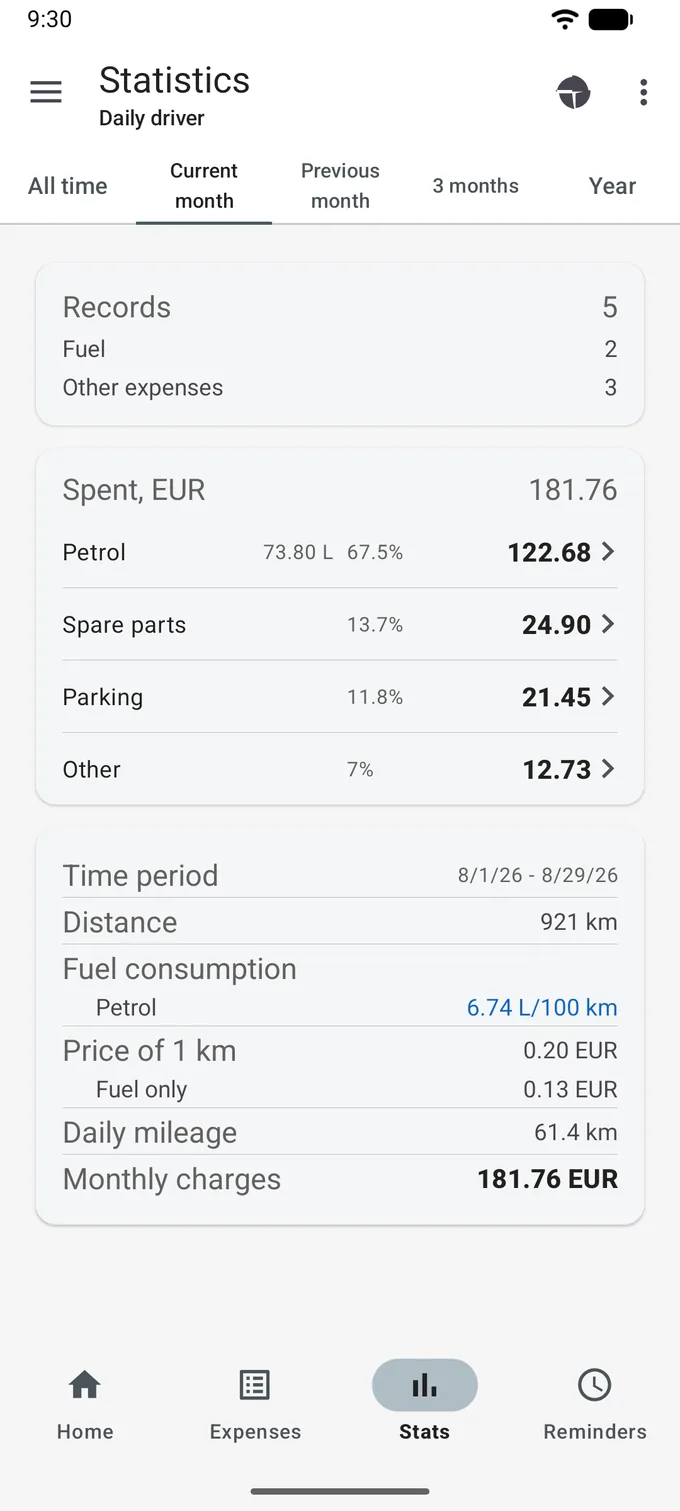
Where the money actually goes
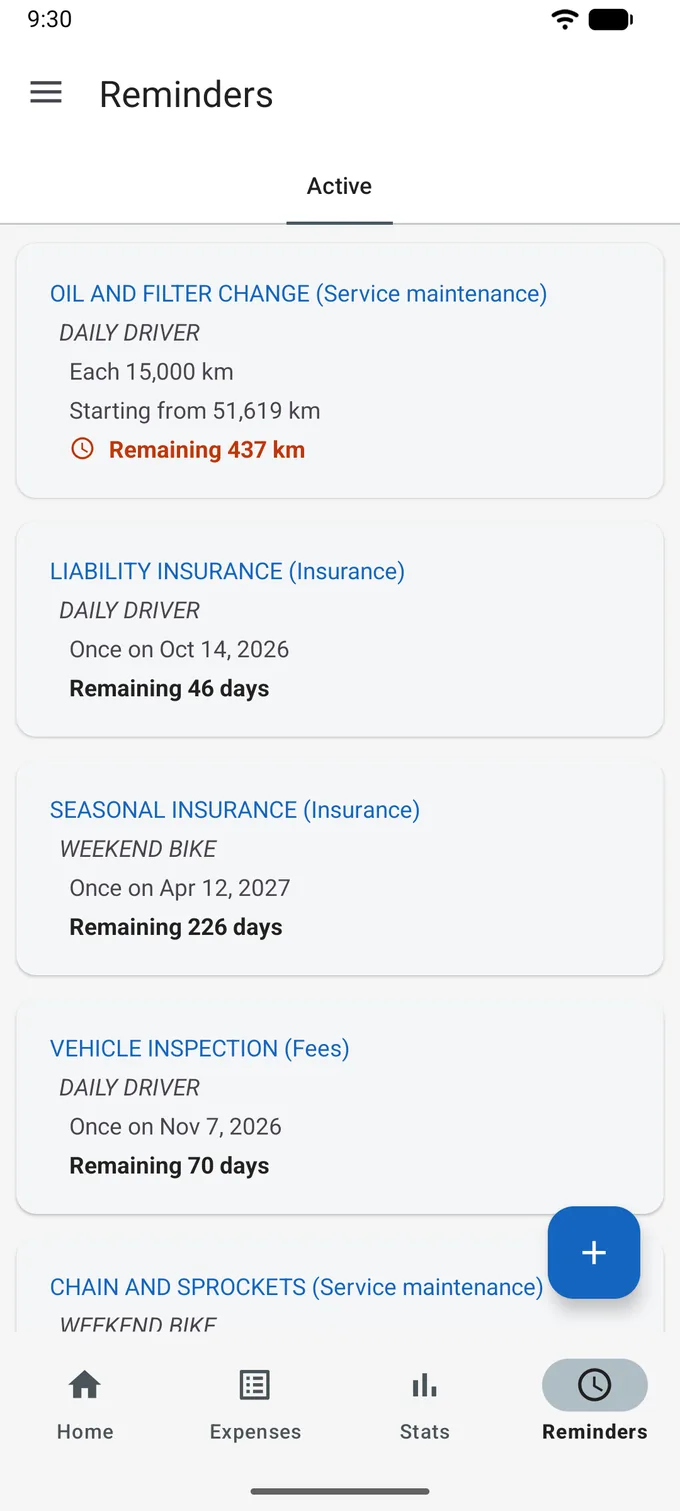
What is due, and how far off it is
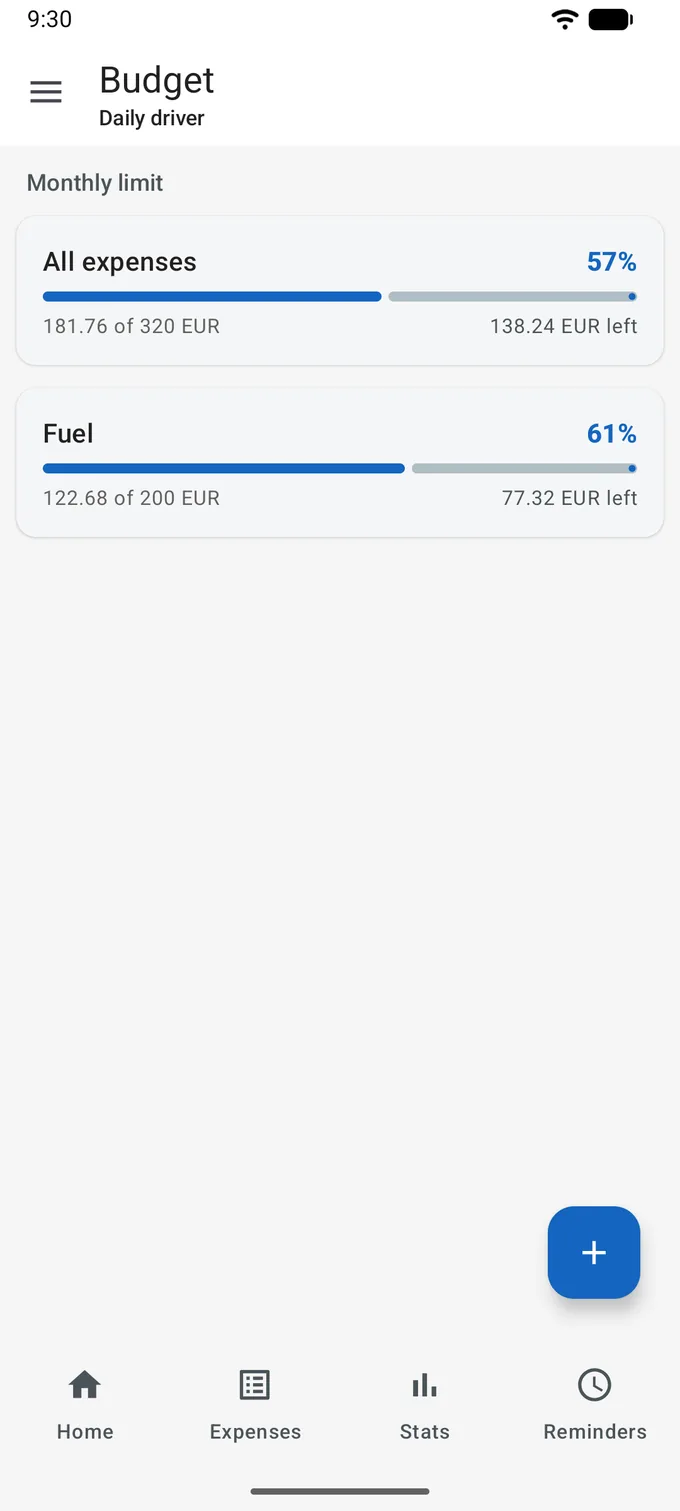
How much of the month is already gone
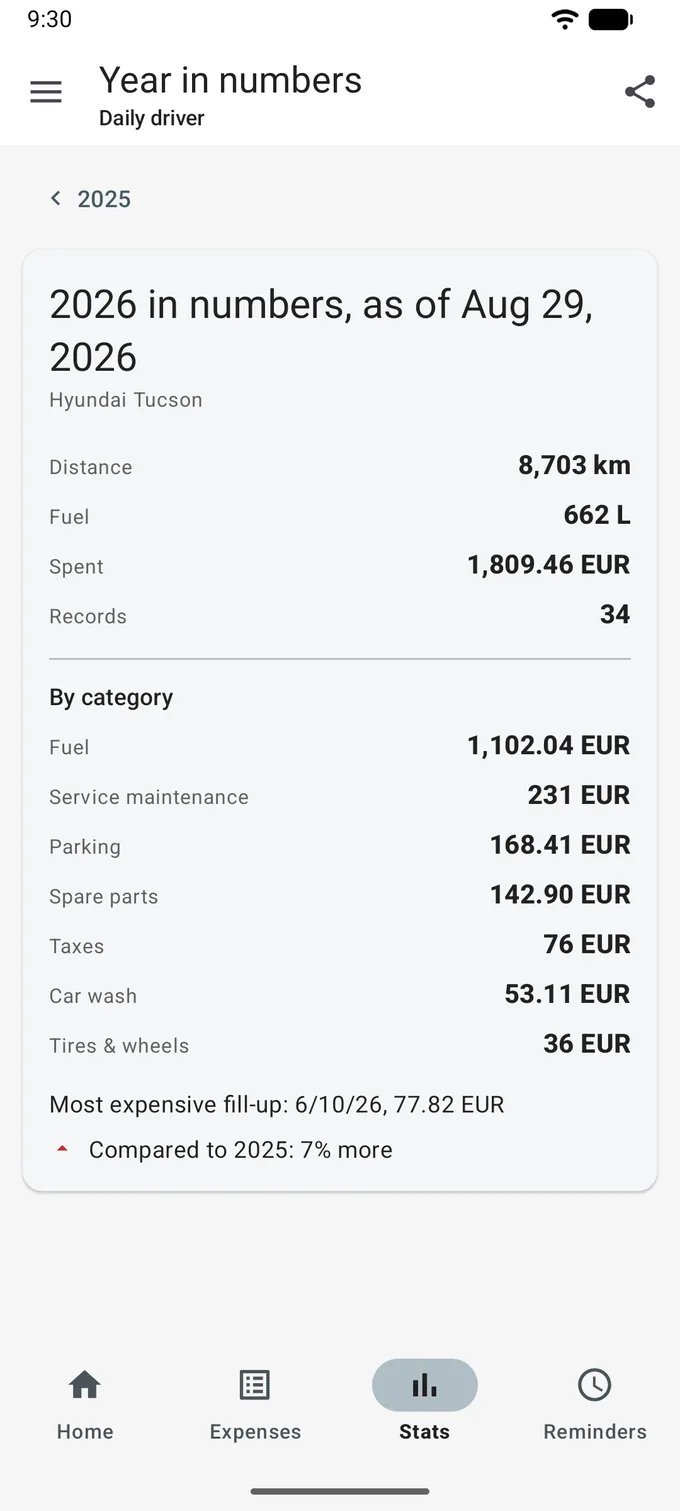
What the year cost, against the one before
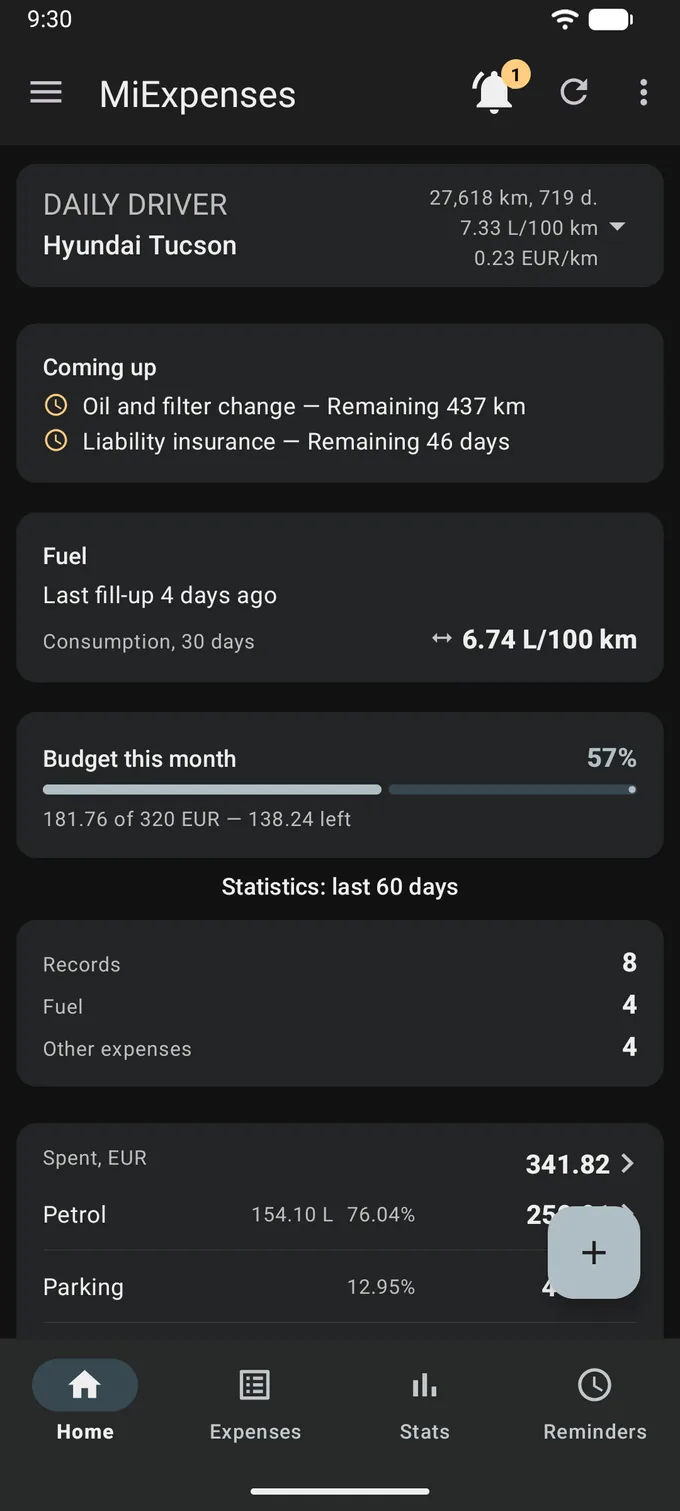
Six colour themes plus Follow system